







|
|
Email Overload: Exploring Personal Information Management of Email
Steve Whittaker and Candace Sidner
Lotus Development Corp.
Keywords
Email, information overload, personal information management, asynchronous communication, filing, task management, interpersonal communication, ethnography, empirical studies.
Email applications were originally designed for asynchronous communication, but as our analysis will show, email has evolved to a point where it is now used for multiple purposes: document delivery and archiving; work task delegation; and task tracking. It is also used for storing personal names and addresses, for sending reminders, asking for assistance, scheduling appointments, and for handling technical support queries. We use the term email overload to describe the use of email for functions that it was not designed for . We discuss three main email functions: task management, personal archiving and asynchronous communications. The central question is how well a single tool can support all these functions. Subsidiary questions must also be asked in each category.
Task management requires users to ensure that information relating to current tasks is readily available. This both preserves task context and allows users to determine the progress of ongoing tasks. Task management also involves reminding oneself about when particular tasks or actions have to be executed [1,2,4,6]. How do people do this in email?
Personal archiving or filing addresses how people organise and categorise longer term information, so that it can later be retrieved. Archives are not of immediate relevance to current tasks, but are constructed for reference or anticipated future use. Research shows that users experience major problems in generating appropriate folder labels when filing longer term information for later retrieval, and in reconstructing these labels when they engage in later retrieval [1,2,4,6]. To what extent do these problems occur in email?
Asynchronous communication is concerned with interaction in a permanent medium across space and time. Research has characterised face-to-face workplace communications as consisting of repeated brief communications [3,10]. Such interactions are seldom one-shot, and workers often engage in multiple intermittent interactions in order to complete a task. Workers are also usually engaged in several independent, but concurrent ongoing conversations, with the requirements of tracking separate conversational threads and switching contexts between conversations [10]. Does email communication have these characteristics, and how are asynchronous communications conducted?
To provide preliminary answers to these questions, this study presents qualitative and quantitative information about the use of email for task management, personal archiving and asynchronous communication. We describe the problems people experience with each of these functions, and the strategies they invoke to address the problems. Finally we suggest potential technical solutions.
The 20 study participants were office workers representing four major job types: 4 high level managers, i.e. people who had other managers reporting to them; 5 first level managers; 9 professional workers with no management responsibility, and 2 administrative assistants. All participants were experienced users with between 2 and 15 years experience of email. They had all used NotesMail for more than one year. All participants were employees of Lotus Development Corporation, a software development firm. We chose our subjects because we wanted to investigate email use in multiple job types, with different responsibilities. Our participants were drawn from marketing, consultancy, software development, support and research groups. We chose the organisation both because of its pervasive use of email and ready access to subjects. Given these choices, we studied NotesMail because it was the most frequently used system in the Lotus organisation.
We collected quantitative data about the mailbox of 18 users: (a) total number, age, and size of messages in their mailbox; (b) number of messages in each archival folder, (c) conversational threads. Due to technical difficulties, we were unable to collect quantitative data for the final two users. Ideally we would have wished to collect longitudinal data over an extended time period, to look at changes in mailbox size and structure, but the logistics of repeated access to personal data prevented this. We were however, able to collect a "snapshot" of each mailbox at a given point, from which we drew important inferences, which we report below.
We also interviewed all 20 participants for 1-2 hours using semi-structured questions. We asked them to describe: (a) the volume of email they sent and received; (b) their prioritisation, reading and reply strategies; (c) their correspondence management, e.g. when they used reply, cc and bcc features and how they managed conversational threads; (d) their filing behaviours. We also discussed: (e) the main problems they were experiencing with email; and (f) their reactions to certain technical solutions addressing these problems. Interviews were carried out in people's offices and participants were encouraged to demonstrate their statements and strategies with reference to their actual systems.
We analysed our interviews by collecting user comments about each issue described above. We present representative quotes from participants about these, and where there was substantial disagreement or inconsistency between participants' opinions, then we present quotes representing alternative points of view.
"Waiting to hear back from another ...employee can mean delays in accomplishing a particular task, which can ... have significant impact on our overall operations. Depending on the situation, it can either be critical or just frustrating."
"One of my pet-peeves is when someone does not get back to me, but I am one of the worst offenders. I get so many e-mails (average 30-40/day) and phone messages (15-20) that I cannot keep up and also do my real job..."
"given the sheer volume of stuff that passes through here. I mean I couldn't even give you a percentage of how much is missed. I mean - -- not necessarily missed but certainly recorded but never followed up on"
"I dedicate somewhere between minimally two hours at the outlying range, up to ten hours on any given day trying to stay on top of email"
So why do these problems arise? A simple one-touch model of email might assume: incoming messages that are informational, i.e. those not requiring a response, are read, and then either deleted or filed, depending on their relevance. Incoming messages that form part of a correspondence, (i.e. requiring a response), are answered, and then either deleted or filed. According to the one-touch model, information can therefore be in two possible states: unread and filed. The user's inbox at any point should solely consist of a small number of unread incoming messages, and the rest of their mailbox consist of filed items.
Our quantitative data show the one touch model is patently incorrect. The mean number of inbox items is 2482, and the mean number of filed items (858) is small compared with the number of inbox items, so that the inbox constitutes on average 53% of people's mailfiles. It is implausible that users receive 2482 new items each day, so what is happening and why is the inbox so full? It turns out that there are two related reasons for this: (a) the inbox operates as a task manager, where people are reminded of current tasks, and where people can keep information relevant to those tasks accessible; (b) people find it hard to file information to remove it from their inbox, both because filing into folders is difficult and there may also be few benefits to creating folders.
"it's where things come into your life in a way. It's the place where ... people hand things off to you, it's the electronic office"
Email can be an important determinant of how people spend their working day, again suggesting that it is a place that users receive and hand off tasks:
"I check it before I leave the house just in case there's anything I didn't get the night before. I read it as soon as I get into the office. ..... It does change what I do throughout the day, like what -- I may come in thinking I was going to do one thing, but get mail that sort of diverts me into doing something else..... If I haven't checked my mail it makes me uncomfortable. And there's invariably a piece of something I was supposed to do, that's time sensitive".
Both the volume of incoming mail and the fact that mail is being used for task management, leads to a breakdown in the one-touch model. While there is evidence that users try and process information at once, there are a number of reasons why immediate responses are sometimes not possible or not appropriate, so that incoming messages remain undischarged in the inbox.
One general reason relates to the amount of time users have currently available. If the message requires more than a certain amount of time or effort to process, then users delay dealing with it and proceed to other potentially more urgent or manageable messages in the inbox. There are also specific types of messages that are often not discharged immediately:
(a) "To dos" These are messages which require the user to execute some action. In some cases, the message may require the user to engage in further complex activities which might take days to achieve. The user does not usually suspend the process of reading email to discharge these activities. These "to dos" are commonly kept in the inbox as reminders of unfinished tasks.
(b) "To reads" Alternatively, messages might be long documents. Although these are often informational and do not require a reply, they still take time and effort to read, and users often delay reading them, so that the inbox may contain unread or partially read documents. The quantitative data support this. We found that on average 21% of the inbox (i.e. an average of 334 messages) were long, when a long message was defined as more than 10Kbytes (~5 screensfull).
(c) Messages of indeterminate status One issue with informational messages, is that users are often unsure of the significance of an incoming message when it first arrives. Rather than investing valuable time in reading it at once, they register its arrival, but delay dealing with it until some later point when they are more certain of its importance. What makes immediate decisions difficult, is that the value of a given message may depend on events that occur after the message has been received: a flurry of subsequent messages on the topic may reveal its importance, or else it may turn out to be a "dead-end" with no follow-up being necessary. Rather than delete it immediately, users often conservatively retain it just in case it turns out to be important. This user describes keeping such documents in her inbox:
"I've gotten messages, I haven't dealt with them, haven't known what to do about them. And starting this new position, .... I got a lot of mail messages, but I didn't have the knowledge to know what on earth they were about ... You know, people were talking about servers and infrastructure....I just realized some day I would understand it, and I saved a lot of that stuff, and actually had to make a presentation where it all came in handy -- where I went, I've been sitting with this information all this time and I didn't know it..... so you're conservative about keeping stuff, and ...at some point in the future it may come in useful."
People also explained how retaining such unread messages was useful for unplanned contingencies, e.g. when they received surprise phone calls about them. They were able to read the documents in the course of the call, while pretending to have already read them.
"[email] is the best that's ever happened for covering your ass ... because while the guy's on the phone, he says, well, I sent that to you a week and a half ago, and you think, shit, I never saw that. But you say, 'really? Yeah, oh yeah, I remember reading that', as you're reading it."
(d) Ongoing correspondence. Finally the inbox is sometimes used for ongoing, but incomplete, threads of asynchronous conversations. The user may delay responding to a question from another person because a careful reply is necessary which takes more time than is currently available. Alternatively, users may be unable to reply immediately, because they currently do not have the answer, and they await further information from other people.
For more complex interactions involving multiple exchanges over an extended time period, users may also track and sometimes save, both their own and other people's contributions to the conversation. An issue may take several email exchanges to be resolved, or users may require the responses of multiple individuals in order to collate opinion, or reach consensus. A major problem with email correspondence is that there are no agreed conventions about whether to include the context or history of prior messages as the conversation proceeds. Often this context is important, because it is necessary for interpreting what each subsequent message means. One user describes this problem with one of his coworkers.
"X is unbelievable in that he never puts the context in which, of what he's replying to. He always comes up with these one line responses, and I have no idea what it is that he's talking about, you know, it's like, "Re: the Internet." ... And, in many cases, he's replying to something that somebody else sent, but I wasn't on the original distribution list, but he thinks that I'd be interested ...So I get this totally out-of-context great idea"
For multiple interchanges extending over periods of days or weeks, it is easy to forget who said what and to whom. For legal purposes, it can also be important on occasion to record exactly what was said by whom. For these reasons, for certain critical interactions, users sometimes save both the originating message, as well as subsequent interactions.
"the people that I consider some of the best problem-solvers in my organization are fanatical about the history. And you get the whole thing. Yeah, the audit trail of what happens. We do that, have to do that a lot in support...Because you could be dealing with an extended customer issue that bounced around ... especially the people that are right on the front lines, it's almost like second nature to them... It's not only everything that's being said... It's every person that has been involved"
This conversational record serves multiple functions: an archive of what has been discussed; a reminder to the user that the conversation is in progress; and a record of the status of the conversation, and whether one "owes" or is "owed" a response. The importance of conversational tracking, as well as the absence of conventions about whether others will include history, can mean that each exchange of a lengthy conversation will appear as a separate message in the inbox. Not only does this increase the number of messages in the inbox, it is often difficult to gather together the related threads of a conversation, because conversational exchanges are often interleaved with other unrelated information.
"That reply with the history of previous stuff .... when some people do that and some don't and the fact that it's all interspersed with all other kinds of crap in my e-mail, and then I just can't pick up an e-mail and find out what else it belongs with".
The quantitative data indicate the pervasiveness of inbox conversational threads. We examined the subject line of each message and counted the number of instances in which it contained " re", signalling it was a reply to an original message. By this metric {1}, we found that inboxes contain a mean of 209 such messages, and that these constitute 12% of the total inbox messages.
To summarise, multiple types of items linger in users' inboxes: actions the user has yet to do; documents that are partially read or unread, and correspondence that is still in progress. What unifies these is that they are all incomplete, and the usual strategy is to leave them in the inbox to serve as reminders that some further action is required. They are not normally filed away, because filing would mean that they are no longer visible whenever new email is read or the inbox searched.
"the reason that I don't categorize things but leave them in here [the inbox] is that I realize .... there are a certain number of things that I keep in my mind, and I will go back for... And others, I do have to count on tripping over them. And as long as there is that mess that I know I have to do the multiple passes of reading over... I'm kind of depending on that serendipitous tripping over it again as a way to remind me"
The importance of this visual reminding function is evidenced by the fact that five users had experimented with a strategy of filing undischarged information in an "action", or "to do", folder. In all but one of these cases, this action folder was abandoned, because users had to explicitly remember to go to it, open it and view its contents, rather than being reminded of these unintentionally, by the mere fact of being in the inbox reading new email. {2}
" I used to have an "unread" folder. Which was messages I'd opened up, but I had never finished reading. Like those big ones that ... I didn't get through right away. I didn't go back to it [the unread folder] often enough though".
The single person who was successfully using "to do" folders had reconfigured her mailbox UI, so as to be reminded about this folder. Her "to do" folder appeared immediately above the first new unread item in her inbox, so that she would automatically see the "to do" folder whenever she read new email.
A second reason for leaving information in the inbox concerns its availability. In the case of extended interactions, users often keep conversational history in the inbox, because they believe it to be more accessible there.
"you may not want to file it. Because it might be something you need to refer to. .... I don't want to file that yet, because it's active ... there are things that are happening as a result of that. It's easier for me to find it. So I want to keep in my "in" box, keep it current"
Filing is a cognitively difficult task [2,4]. Successful filing is highly dependent on being able to imagine future retrieval requirements. It is hard to decide which existing folder is appropriate, or, if a new folder is needed, how to give it a memorable name.
"any piece of information longer than five lines has at least several axes along which you might want to look it up and it really depends how you're coming at it and what you're thinking about at the time. [Filing] isn't reliable."
Users also may not file messages because they are concerned about failure to remember where information has been filed. Failure can have severe consequences especially if the message requires action:
"I don't know where to put it. And .. by making a wrong decision, I could really forget about it..."
Another reason for not filing is that users want to postpone their judgement in order to determine the value of information. Users do not want to create archives containing information that later turn out to be useless or irrelevant. The strategy here is to wait and see the extent to which subsequent events indicate a message is valuable.
"I'm reluctant to archive junk. ... I know that the consequence of archiving junk is to make it that much harder to find the good stuff ... in the archive...Especially if information seems like it eventually will be overcome by events, I'd be very loath to move it into a [folder]. I'd be more likely to kind of hold it in my "in" box"
Folders may also not be useful after they are constructed. One problem is that users may not be able to remember folder labels, especially after a time has elapsed: "if it's sort of older stuff, the category names are not going to mean anything to me any more". Users experienced special problems when they had large numbers of folders. They had to remember the definition of each when filing and to be careful not to introduce duplication by creating new folders that were synonymous with pre-existing ones. Duplication detracts from their use in retrieval.
In addition, folders can be too small to be useful . A major aim of filing is to reduce the huge number of undifferentiated inbox items into a relatively small set of folders each containing multiple related messages. Filing is clearly not successful if the number of messages in a given folder is small: if a folder contains only one or two items, then its existence has not significantly reduced the complexity of the inbox, nor gathered together significant amounts of related material. However our data show that filing often fails: on average 35% of users' folders contain only one or two items. Furthermore, not only do these tiny "failed folders" not significantly reduce the complexity of the inbox, the user has the dual overheads of (a) creating them in the first place, and (b) remembering multiple definitions every time there is a decision about filing an new inbox item.
The quantitative data reflect the problem of trying to remember multiple folder definitions. The larger the number of folders a user has, the more likely that person is to generate "failed folders" containing only one or two items ( r(16) = 0.75, p < 0.001) . User statements bear this out:
"I wish I viewed creating a category as a lightweight activity. And for some reason I don't .... it seems like, you know the more of them I create, the harder it is to find any of them that are there".
Folders can also fail because they are too big. When there are too many messages in a folder, it becomes unwieldy. It is difficult to find the relevant message in a large folder, the relationships between different messages in the folder become tenuous, so that one benefit of keeping them together is much reduced.
"So what happened was the size of the chunks associated with the categories got large. So now one key stroke would get me to a hundred things. So I really was no better off (filing information)"
To conclude, we have seen that users experience difficulties in creating folders. In addition, the returns for this effort may not be great: folders can be too large, too small or they may be too numerous for people to remember their individual definitions. As a consequence, folders may be of little use either for retrieval or for viewing related messages together. There is also a third problem: filing information means that it is less available to remind users about that topic. Some users therefore to finesse this problem: instead of filing incoming information, they simply leave it all in their inbox and use full-text search to find individual messages. We now examine users' strategies with respect to the problems of organising the inbox, so that it can be an effective method for managing ongoing tasks and conversations.
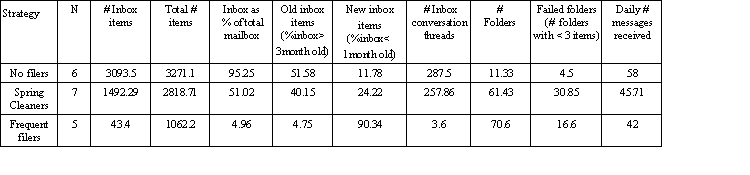
No filers: made no current use of folders (mean 11.33), but relied on full-text search to find information. Their folders were historic remnants from when two of the no-filersstill filed. As a consequence of not filing, their inboxes were huge (3093.5 items, making up 95% of all their email). Their inboxes were overloaded: they included a large numbers of conversational threads (mean, 288). More significantly, over half of their inbox was old information that arrived more than 3 months ago. Their strategy for reducing the size of the overloaded inbox was periodic purges in which they deleted large numbers of old items or copied them to a separate independent archive. Four of the six no filers were managers.
Frequent filers: made strenuous attempts to minimise the numbers of inbox messages. They made daily passes through their inbox filing or deleting its contents. Their inboxes were relatively small, containing only 43.4 items, which was a very small percentage (5%) of the total number of mailbox messages. In addition, the inbox consisted almost exclusively of new items (90% were less than a month old, and only 5% were older than 3 months), and it was almost devoid of conversational threads (mean 3.6). They made frequent use of folders, and were relatively successful in their use of these, with only 21% being "failed folders". The five frequent filers included both the administrative assistants, but only one manager.
Spring Cleaners: dealt with the overloaded nature of their inboxes by intermittent clean-ups - normally every 1-3 months. They made extensive use of folders, even though this was often unsuccessful, as evidenced by the fact that over half of their folders "failed". They also had large overloaded inboxes (mean, 1492.3), containing large numbers of conversational threads (mean, 258). Over 40% of their inbox messages were more than 3 months old. Four of the seven spring cleaners were managers.
"I don't have any other system, that keeps track of an e-mail message that needs a response .... usually the next day, hopefully it's still sort of near the bottom of the [inbox], .... I will see it when I look at new mail messages, so it won't get scrolled off the screen".
"But I live in the inbox And that is kind of my to-do list. I'll keep things in there ... there's probably about twenty or thirty in there now of things that I want to keep like in my frontal lobes, that I have to deal with"
Frequent filers are effective in their use of folders, experiencing fewer "failed folders". This may be because of frequency with which they file enables them to remember the label definition and contents of each folder. However, despite the benefits of the clean "to do" list, opportunistic reminding, and the availability of current projects, there are major costs to this strategy. It requires significant maintenance: users have to make frequent passes through the inbox, filing and removing discharged items.
".. after I read the new day's mail... I go back to the whole "in" box, right back. And there's almost like a sifting that keeps happening, where the less pressing ones start ageing. And it gets to the point where I say, "I'm either not going to do something about this" .... And I just delete them".
It may be that frequent filing is only possible for lower volumes of incoming email, and for job specifications which do not require users to be away from their desk for long periods of time. Workers such as managers receiving higher volumes with less time to process email may not be in a position to exploit frequent filing.
The no filing strategy stands in direct contrast to frequent filing. Here users make few attempts to reduce the complexity of their inbox. When possible they answer messages as they receive them, but they seldom review the inbox for outstanding undischarged messages. The fact that their inbox is cluttered with threads, as well as partially read and unread messages, means that outstanding tasks are not easily visible and are quickly displaced and scroll out of sight. Opportunistic reminding and task tracking are therefore unlikely to occur{3}. Users of this strategy admit that the clutter in their inboxes results in important tasks sometimes being overlooked.
"When you're dodging all this other stuff it's hard to pull out what could potentially be pretty important... like anyone else who may have that volume.... after a couple of days you're not going five screens up anymore. You're just looking at your current screen or maybe one more. Who knows what you've missed. I was on vacation for two weeks. Who knows what ... passed through ... e-mail during that time.... I saw a lot of it but I ... let a lot go by. I find that the most aggravating thing is when the inbox starts to grow and I don't know what to do with it necessarily".
When high volume of incoming email is accompanied by large amounts of time away from their desks, this may reduce the likelihood of no-filers constructing elaborate filing systems or engaging in extensive periodic clean-ups. The following no-filer described why he had abandoned any attempt to manage his inbox.
"Because what I used to do was use [spring cleaning] as a way as organizing and reviewing and catching anything that was falling off the end of the earth. I've given up on it. ... where am I going to get that time? If I wake up at three AM, and I've got nothing else to do, that's when I'm going to do it".
The spring cleaners are intermediate to the two other strategies. As with no-filers, as their inbox gets large, its size and complexity makes it ineffective as a "to do" list. The fact that it is usually cluttered with threads and unread messages means it is poor for task management, so opportunistic reminding is unlikely to occur. Furthermore the inbox was perceived to be of little archival use.
"it might as well be deleted as buried in this pile of junk .... E-mail may have value, but I will never avail myself in its current form, in this mail file. And so, it might as well be gone as sitting there, because either way I don't have it. It's not at my disposal and not usable".
Spring Cleaners have very strong feelings about the disorder of their inboxes: they use terms like "disgust" to describe their reactions to their inbox and are motivated by "seizures" to clean up. However the fact that they do occasionally go through the inbox means that outstanding unprocessed messages are detected and can be replied to, even if these are sometimes late.
"So what I started to do was, either weekly, ... then monthly, I would go back to my mail, partly to categorize it and actually truthfully to catch things that I had just dropped the ball on"
This group seems to be less successful at creating useful folders than frequent filers. One possibility is that spring cleaners create folders infrequently, so that they forget folder definitions. Hence they may create duplicates of already existing folders. In terms of maintenance this strategy stands between the others: it does not require the daily efforts of frequent filing, but occasional clean-ups are required. This strategy choice may be explained by the inputs and workload of spring cleaners: they receive fewer messages and are less likely to be managers than non-filers, giving them more time to devote to managing their email.
We then tested these observations statistically. Because of our small subject pool, we were forced to combine data from both spring cleaners and no filers, in order to make comparisons. The analysis shows that frequent filers differ from the other strategies in a number of respects: they have smaller mailboxes ( t(16) = 2.35, p < 0.05), and smaller inboxes ( t(16) = 3.94, p < 0.005). Frequent filer's inboxes contain fewer inbox threads ( t(16) = 3.99, p < 0.005), and also tend to consist of newer items ( t(16) = 2.41, p < 0.05). Furthermore, there is a suggestion that they are more successful filers, with fewer "failed folders" ( t(16) = 2.06, p = 0.058).
Finally we looked at the impact on strategy choice, of factors such as organisational role and incoming volume of messages. We found only partial statistical evidence for the effects of role and volume. Managers were more likely to receive greater volumes of email ( t(16) = 3.06, p < 0.005). We then looked at whether managers were less likely to be frequent filers, given their higher volume of received email and greater time spent in meetings. Although only one frequent filer was a manager, there was no strong evidence of a direct relationship between strategy and status ( chi squared (1 df) = 2.49, p > 0.05).
We now discuss possible techniques to support the three functions. We have shown that the inbox is often used as a place for incomplete tasks, unfiled information and ongoing conversations. In all these cases, users preserve working information in the inbox both to keep it available and as a reminder that further actions are required. We have also seen, however, that opportunistic reminding is compromised when the number of inbox messages is too large, because messages scroll off the screen and remain unseen. A key technical requirement is therefore to reduce inbox clutter to allow visual reminding, but without compromising the availability of working information. We now present technical solutions for each email function addressing different ways of presenting and viewing the inbox to support both availability and reminding for working information.
Although email was originally designed for asynchronous communication, the current system has limitations in supporting this function. The key requirements for asynchronous communication are: (a) threading to support context regeneration and the management of conversational history, and (b) the ability to track the status of a conversation. Users want to avoid: scrolling back through large numbers of heterogeneous inbox messages to find all previous elements of a conversational thread; lost context when someone omits message history; forgetting who has the next turn in the conversational sequence.
How can we address these asynchronous communication problems? One solution to the problem of communication management automatically marks email messages from the same conversation using a common thread ID, allowing the user to collect related messages together, and trace back through conversations. The user would subsequently be able to view by thread. Viewing by thread allows a user to select any message, use that message to access all messages from that conversation, and hence view any message in its conversational context. This functionality is equivalent to having a single message containing the forwarded history of an entire conversation. Unlike a single message, viewing by conversation is not beset by the navigational problem of trying to follow a conversation that is many layers deep, where information may be buried within a single message. Viewing by thread provides several additional benefits. It helps determine conversational status: by looking at the last message in a thread, the user should be able see whether they "owe" or are "owed" a response. Furthermore, it should be possible to file an entire thread, but leave a representative message from that thread in the inbox. This serves the purpose of reducing inbox clutter, even when users choose to copy themselves on every response. As we have seen with frequent filing, a representative message in an uncluttered inbox can remind the user that a conversation is in progress. When the conversation is concluded, the entire thread can also be archived or deleted as the user wishes.
What about filing? Given users' uncertainty about the value of much incoming information, they often end up with large numbers of incoming informational messages in their inbox. These documents are in a "holding pattern", while users attempt to determine their relevance and importance. In addition, our data show that filing may not be crucial for retrieval, because it may ultimately be superceded by full-text search. Nevertheless, users may want to cluster and view semantically related messages together, for example while they learn about a new topic.
How might we support this temporary buffering of incoming information? Information retrieval techniques could be used to cluster semantically related documents automatically, and the presentation of these clustered documents might be analogous with conversational threads. Users might therefore reduce the clutter of their inboxes, by leaving one semantic category exemplar in their inbox as a reminder and filing the rest. As with threads, each incoming message could be viewed in the context of other (in this case semantically) related information. This may partly address the problem of failed folders, and it might also help users to decide the usefulness of an arriving message . Two provisos are necessary here. First incoming documents should not be "filed" before the user has seen them. User comments and their experience with email filters clearly indicated that "automatic filing" was not desirable: users wanted to be made aware of the arrival of incoming documents, otherwise they would be ignorant of their existence. Furthermore, users were concerned that automatic filing would mean they wouldn't know the folder in which a given message had been filed{4}. Second, this semantic classification needs to be dynamic, given that the status of a document can be changed by the arrival of subsequent ones.
Finally, when we consider task management, it is clear that conversational threading and semantic clustering should reduce the amount of inbox clutter by having each conversation or folder represented by one inbox message. The consequent reduction of the number of visible items in the inbox should help users to more easily see their outstanding tasks, and hence support reminding and tracking. Keeping important things "in view" could also be helped by having the inbox temporally sequenced and having threads and folders gradually "decay" by scrolling off the screen if they have not shown recent activity. Two further requirements seem to be crucial for task management. The first is the ability to mark particular inbox items as requiring action. This marker should be highly visible, and it should be possible to view only the "action items" in the absence of threads or folders. Note that this is different from creating an action folder: the action items are not filed away, but remain visible in the inbox, to serve their reminding function. The second requirement is the ability to program reminders. A critical problem occurs with "action items" that either can't be done immediately or don't need to be done at once. Here it would be useful to program these items so they would re-appear as an action item, as the deadline approaches.
Turning to outstanding research issues, we need to test the generality of these re