







|
|
University of Michigan
1101 Beal Ave.
Ann Arbor, MI 48109, USA
E-mail: sw.lcd@umich.edu
ABSTRACT
The design of software for learners must be guided by educational
theory. We present a framework for learner-centered design (LCD)
that is theoretically motivated by sociocultural and constructivist
theories of learning. LCD guides the design of software in order
to support the unique needs of learners: growth, diversity, and
motivation. To address these needs, we incorporate scaffolding
into the context, tasks, tools, and interface of software learning
environments. We demonstrate the application of our methodology
by presenting two case studies of LCD in practice.
KEYWORDS: Learner-Centered Design, Educational Applications, Science Applications, Socioculturalism, Constructivism, Case Study, Scaffolding.
1. INTRODUCTION: Motivation and Goals
The push for educational reform in the U.S. is strong. Currently,
the dominant educational paradigm is "didactic instruction,"
where learning is viewed as an information transmission
process: teachers have the information, students don't,
and teachers' lectures serve to move information into the heads
of students. In contrast, national and state education reform
movements are advocating for students to be actively engaged
in learning, constructing understanding and meaning,
not receiving it. Project 2061, a national science curriculum
developed by the American Association for the Advancement of
Science [1] calls for students to engage in long-term, authentic
investigations.
Computing and communications technologies can play a key role in supporting students and teachers as they engage in such authentic tasks as question-generating, model-building, report-publishing. However, constructing software that truly addresses the needs of learners is a challenge: while learners are also users, and thus the principles of user-centered design apply, learners additionally have a set of unique needs that must be addressed in software:
To address these unique needs of learners, we are developing learner-centered design (LCD) guidelines [24] to augment the user-centered design (UCD) framework [15]. Our current focus is on K-16 learners; however, given Senge's [22] compelling arguments that an organization must be a learning organization in order to be productive, LCD should also have validity for the workplace.
The central claim of LCD is that software can embody learning supports--scaffolding--that can address the learner's growth, diversity, and motivation. Scaffolding is an educational term that refers to providing support to learners while they engage in activities that are normally out of their reach [28, 30]. For example, n undertaking an authentic science inquiry, e.g., what is the quality of water in the stream behind my school, the tasks are more complex and diverse than those in traditional, follow-the-steps, lab-style experiments. Software-realized scaffolding can reduce the complexity of these tasks, for example, by relating discrete subtasks to their current mental representations.
From edutainment to context-sensitive help systems, the need to support learners is well recognized. That said, there are precious few resounding successes (e.g., [6, 16]). Given the formidable educational problems that face our society and the almost-availability of consumer-priced, high-performance computing and communications technologies, the opportunity to actually make-a-difference in education is truly at hand.
In LCD we (see also [12, 14, 20]) are attempting to explore the design implications of learning theories --constructivism and socioculturism -- that have heretofore received less attention than, say, behaviorism (upon which computer-assisted instruction (CAI) is built) and information processing psychology (upon which intelligent tutoring systems are built). While the work reported here is clearly only now maturing, our intent is to focus attention on a fertile, promising direction for research and development.
In this paper, then, we:
2. Theoretical Rationale & Implications
Two resonating theoretical frameworks underlie both the education
reform movement (e.g., [3, 4, 7] as well as our evolving the
LCD framework:
In constructivism (e.g., [14, 16, 17, 28]) the central notion is that understanding and learning are active, constructive, generative processes such as assimilation, augmentation, and self-reorganization. For example, a teacher's words do not simply become directly engraved in a student's mind, after passing through the ear, but rather, those words are acted upon and interpreted by the student.
In socioculturism, the central notion is that learning is enculturation, the process by which learners become collaborative meaning-makers among a group defined by common practices, language, use of tools, values, beliefs, and so on [5, 14, 21, 29]. The goal is to enable practices and meaning making that are appropriate in the professional culture of the domain under study. For example, scientists understand science as those ideas are embodied in their everyday practices. Contrast this way of knowing with traditional science classrooms where, from the students' perspective, concepts come from textbooks and lectures, and lab experiments are tightly-controlled exercises that fit into the requisite 50 minute period.
These two theoretical perspectives are consistent with each other; they just emphasize different themes: the former speaks to the individual's cognition, while the latter speaks to the contributions of the surroundings to that cognition.
From socio-constructivism, then, guidelines for the design of learning environments and the supporting scaffolding can be developed (e.g., [9, 11, 20]). In particular, in LCD, we are attempting to provide guidelines for the construction of scaffolding strategies, to address the three unique needs of learners (growth, diversity and motivation) for each of the four components in a learning environment:
Examples of LCD scaffolding guidelines are given in the following case studies.
3. LCD: Two Case Studies
Model-It and NoRIS are learner-centered software tools which
we have designed for two different contexts:
In our discussion of each example, we first present the software design, and how it incorporates scaffolding to address learner's needs regarding software context, tasks, tools, and interface. Then, we present examples from the user testing data which illustrate the impact of specific software features designed to provide scaffolding.
3.1 Case Study One: Model-It
Model-It is designed to support learners in building and testing
models of dynamic systems. Scientists build models to test theories
and to develop a better understanding of complex systems [13].
Similarly, we want to support students in the building of models,
as sociocultural learning theory says that learners should be
involved in professional practices. Constructivist learning theory
predicts that by constructing external representations of scientific
phenomena, learners are building an internal, mental model of
the phenomena. We believe that by building models, students will
support, refine, and develop their understanding of a scientific
system by constructing models to represent their understanding
of the phenomenon and its complex interrelationships.
The modeling tools that have typically been designed for students fall into two categories: pre-defined simulations, and modeling environments. Pre-defined simulations, such as Maxis' SimEarth and Wings for Learning's Explorer, are not constructivist; although user-friendly and informative within their pre-programmed domains, they do not provide access to underlying functions and representations which drive the simulation, nor the ability to add or change functionality. On the other hand, modeling environments, such as High Performance System's Stella or Knowledge Revolution's Working Model, allow unlimited flexibility in building models. However, they are difficult to learn because they don't support the novice's knowledge representation of the domain; for these tools, building complex models requires mastery of a complex authoring language [26]. Thus, current modeling tools inadequately address the needs of learners.
3.1.1 Design and LCD Scaffolding
Context: Model-It, with its emphasis on
building and testing models, is designed to be used
in an authentic, project-based science curriculum, grounded in
constructivist and sociocultural educational paradigms. The 9th
and 10th grade students in our pilot studies have been engaged
in a long-term project investigating the question "How safe
is our water?" Specifically, they are studying a tributary
of the Huron River which flows near the school, collecting a
variety of data to determine the quality of the water. Since
this water eventually ends up in their drinking fountains, the
question is motivating and personally meaningful to the students.
Using Model-It, the students constructed models of the stream ecosystem (Model-It can be used to build a wide range of process flow models; for our preliminary classroom study we chose the domain of stream ecosystems. In our description of the program, we use examples from this domain.), and were assigned open-ended projects in which they were asked to build models to represent their choice of particular stream phenomena, e.g., land use practices: the impact of man-made structures such a golf course or parking lot on stream quality. Creating models is motivating to students because the students are engaged and challenged to create an original artifact. Furthermore, as students have more input into the choice and control of their environments, their motivation for pursuing cognitively challenging problems increases [2]. Allowing students to decide how to plan, design, and work on their models can engage them in the learning process.
Tasks: Model-It scaffolds the complexity of the modeling task by providing a set of pre-defined high-level objects (e.g. stream, bugs, golf course). These physical objects match the learner's knowledge representation of the domain, in contrast to an expert's knowledge representation which might consist of domain-independent primitives of inputs, outputs, functions and states.
Students select from this set of objects, define factors of the objects, and relationships between the factors. Model-It redefines the task of defining relationships by supporting a qualitative representation of relationships, rather than requiring formal mathematical expressions. This scaffolding is important for learners because their knowledge structures don't initially include a quantitative command of the concepts involved.
Tools: Learners need tools appropriate for their learning styles and levels of expertise; therefore Model-It provides tools for both qualitative and quantitative definition of relationships. Initially, relationships can be defined qualitatively by selecting descriptors in a sentence, e.g., "As stream phosphate increases, stream quality decreases by less and less" (Figure 1). As students' knowledge representations of the domain become more expert-like, they have the option of defining the relationship more quantitatively, e.g., by entering data points into a table (Figure 2). Model-It also supports a similar qualitative definition of rate relationships which define how one factor sets the rate of change of another factor over time.
To support different learning styles, and to facilitate the learner's shift to more abstract mental representations, these tools provide both textual and graphical representations of relationships. Given a qualitative definition, the software translates the text into a quantitative visual representation; e.g. "decreases by less and less" is interpreted as shown by the graph in Figure 1.
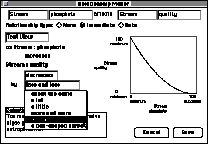
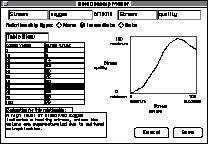
Figure 2: Quantitative relationship definition: Table View (es_fg2.jpg)
The Factor Map (Figure 4) provides an interactive overview of the model. It helps students structure the task by providing a means of visualizing the network of factors and relationships, rearranging the nodes in a meaningful way, and making changes (e.g., drawing an arrow to create a new relationship).
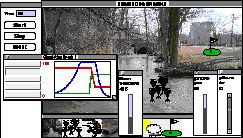
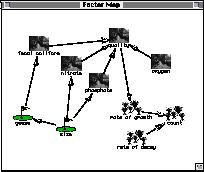
Figure 4: Interactive overview of the model: Factor Map (es_fg4.jpg)
From a constructivist perspective, interactively working and reworking the representation enables the student to continue constructing their knowledge representations [17]. By integrating the building and testing components of modeling, Model-It supports an iterative process of model construction.
Finally, to encourage students to reflect, and therefore extend their knowledge and their metacognitive skills, the interface encourages articulation by providing explanation fields (e.g., Figure 2) where students can enter explanations for the objects, factors and relationships they create.
3.1.2 Results
Versions of Model-It have been used in several classroom studies
with 9th and 10th grade students. In each, students have worked
in groups of two with the program, over a period of one or two
weeks. Each study culminated in the assignment of an open-ended
modeling task, where students were asked to create their own
models to represent some chosen ecological phenomenon. In [12],
we present a detailed analysis of the data. The following discussion
focuses on a representative pair of students, Paul and Jim, two
9th graders from our first classroom study, and how Model-It
scaffolded them in creating a complex model in just one 45-minute
period.
Context: The open-ended modeling task assigned to the students gave them the flexibility to branch off and explore different topics, and to express their own understanding. For example, to demonstrate land use impacts, Paul and Jim chose to put the golf course object into their model, and show how factors of the golf course might affect the stream and the organisms living in it:
J: Let's use that one.This opportunity to build their own models was extremely motivating for Paul and Jim; they displayed excitement and enthusiasm for the project throughout the class period. Once they had completed their initial goal of representing the golf course impact, they branched out on their own to create more relationships, from the stream quality to the mayfly population. They expressed pride in their model, and called the teacher over to show it off to her. This reaction was typical of the entire class; as one student said in post-interviews, "It makes you think more about a real-life situation, where's there's no real answer--you set it up and everything."
P: The golf course?
J: Yeah, we haven't used that one yet.
P: How the golf course affects what, though?
J: How the golf course affects, um, bacteria.
P: Too hard.
J: It's easy. Because the golf course, a lot of geese are on the golf course, and the geese feces go in the water.
P: Oh, and it affects fecal coliform
J: Which in turn affects the bacteria, and the fecal coliform grows on bacteria.
P: Okay, where do you want the golf course?
J: Right there.
Tasks: Students were comfortable expressing themselves qualitatively, and using the qualitative definition of relationships, they were able to build complex relationships very quickly:
P: As geese increases fecal coliform increases at about the same. And then if we want, it won't take long to put in nitrates.Paul and Jim created four accurate, interrelated relationships in four minutes, and in the next four minutes, tested and verified their model, and found another relationship to add (they realized that the size of the golf course should affect the number of geese on it). Figure 4, above, shows the factor map of their final model. In class discussion, they proudly described how their model worked:
J: Okay.
P: We can add that in.
J: Cause that's part of fertilizer...
P: Cause that's part of fertilizer, yeah. So we go to stream...okay...to nitrates N I T nitrates.
J: Lesser and lesser.
P: The size of the golf course affected the geese, the number of geese...Tools: Providing a variety of modeling and visualization tools proved very useful for learning, as students could choose the tool which made the most sense to them. For example, we provide both qualitative and quantitative means of defining relationships to support students at different levels of expertise. While Paul and Jim exclusively used the qualitative "text view" tool, another classmate preferred the precision afforded by the quantitative "table view." Often, students transitioned from one to the other during our longer studies, switching to the "table view" when they realized a need to make their models more accurate.
J: The more land there is the more geese... And the more geese the more fecal coliform.
P: The golf course size affected nitrates and phosphates...because the bigger golf course has more fertilizer and fertilizer has nitrates and phosphates in it.
Teacher: Do you have any [relationships] going to quality?
P: Well I'm getting there, okay? This is complicated! Okay, fecal coliform goes to quality, phosphate goes to quality, nitrate goes to quality... And then the quality went to rate of growth.
Teacher: Why?
P: Because the better quality...
J: There is the more mayflies can grow. And then the growth went to count and the decay went to the count.
Interface: Meters and graphs provided visualization of simulations as they ran, and were used for model testing and verification. For instance, during their testing, Paul and Jim used the meters to try different values of golf course size, and realized that it should affect the number of geese on the golf course, so they went back to put that relationship in: "So, golf course size affects golf course geese. Yeah, we can do it. As golf course size increases, geese increases by about the same."
3.1.3 Summary
Our Model-It testing showed that the software design scaffolded
the learners' growth, diversity, and motivation. Within the context
of this project-based classroom, working on an authentic problem,
students were able to build and test computational models, a
task which is usually inaccessible to learners in high school
science classrooms. Students used modeling tools provided by
the software in ways reflective of their learning styles; their
engagement with the modeling task was evident in their interaction
with the interface as they built and tested their models.
3.2 Case Study Two: NoRIS
NoRIS is designed to provide an environment that will enable
students to use professional computational science tools to carry
out a scientific investigation. More and more researchers are
turning to computational science when they investigate problems
because increased computing power allows them to model physical
phenomena, giving more explanatory power to their arguments.
Therefore, it is important for students to use authentic tools
as they learn to conduct investigations and construct scientific
arguments [8]. However, learning to use computational science
tools and techniques is a complex process that poses difficulties
to the learner.
3.2.1 Design and LCD Scaffolding
Context: NoRIS provides a platform that
enables students to use computational science so
that they can carry out a scientific investigation. NoRIS is
being used in a senior-level nuclear engineering class where
students investigate numerical methods. NoRIS assumes more of
a sociocultural perspective: by giving these students an environment
that reduces many of the complexities inherent in computational
science, NoRIS aims to support students as they begin learning
the tools and practices of the professional researcher.
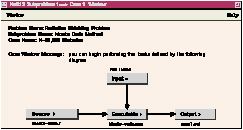
Tasks: Students with little expertise can be hindered by having to remember the variety of disjointed, lower-level tasks that make up an investigation. NoRIS therefore restructures an investigation in terms of high-level tasks:
As well as restructuring the investigative process, NoRIS also reduces complexity by handling the student's managerial tasks, such as artifact management. Artifact management is important because throughout an investigation, the student may have to re-use, modify, or refer to artifacts such as notes, source code, data files, etc. However, it becomes tedious and distracting for a student to coherently organize their artifacts. By supporting artifact management, the student can focus more on their investigation less on mundane, bookkeeping tasks.
Tools: In order to provide an environment that students can use for scientific inquiry, NoRIS provides the variety of tools needed by beginning students to complete their tasks. As we have seen, there are many computer tools that can be used in a scientific investigation: computational tools (such as compilers and algebraic/mathematical software), visualization tools, etc. NoRIS provides this functionality by integrating existing software packages.
However, for tasks such as artifact management, there are no
existing tools that the student can use. NoRIS is designed as
a computer notebook, a metaphor that corresponds
to the student's current mental representations--they know what
it is and how to use it. The notebook metaphor provides an organizational
structure to help students manage the different artifacts that
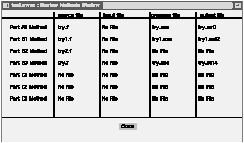
they have created during the argument. For example, NoRIS includes
the Notebook Summary window (Figure 5) that summarizes the different
numerical-method programs that have been written by the student.
Context: Using NoRIS, students were able to complete their particle-distribution assignments, verifying that NoRIS facilitates their investigatory process. We saw that NoRIS gave students an environment that made computational science accessible and investigations manageable.
Tasks: The task decomposition defined in NoRIS helped reduce the complexity of an investigation, and students quickly caught on to the tasks decomposition. They saw that their investigation involved setting up different cases for their different numerical methods and keeping notes on those cases. We soon observed students trying out new experiments by simply setting up new cases, even though their problem did not necessarily indicate that they needed to do so.
We also saw that it was useful for NoRIS to handle some of the student's tasks, such as artifact management. One student noted the advantages of this:
"I am usually disorganized and after a while, I spend a lot of time organizing things--setting up directories, putting codes and things in the right places. NoRIS takes care of this--this really helps because it lets me concentrate on the problem."We also saw that automatic artifact management helped students manage the complexity of re-using and modifying existing artifacts to build new cases. Since it was easy for students to find and re-use old artifacts, students could build new cases from old cases quickly; this encouraged students to experiment with numerical methods by continually modifying a base case for the different experiments.
Tools: Students liked the fact that they had all of the necessary tools available to them in one application. Since students are not experts in using computational science, they may not know what tools to use in given situations:
"[NoRIS] really provides an integrated package that beginning students can really use...having all of the needed information 'at my fingertips' is an advantage so that I do not have to bounce around different programs...this is good for students who are inexperienced with [computers]"By having all of the functionality available to them in one application, the students did not have to be moving from application to application, which can be a problem for students who have little expertise with computational science.
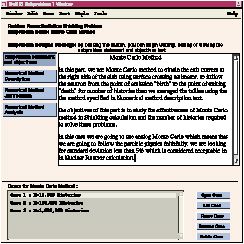
Interface: Students liked using the interface because it was easy to invoke their different tools. The fact that they could use menus and buttons to access many of their tools made it easy for the student to quickly get started with their investigation.
Students also appreciated the different visual cues provided by the interface. For example, one student commented on the notepad button palette that identifies important pieces of information that should be recorded:
"[The button palette] helps lay out the thought process I should be following when I start working on my problem...Seeing [the buttons] makes me pause and think about the problem rather than just jumping in and starting to write programs, which is what I might normally do."The visual cues of the interface therefore structure the task and articulate their thoughts.
3.3.3 Summary
Our user testing has shown that students are able to use NoRIS
to complete authentic scientific investigations, and that they
find the structure provided by the program helpful. Furthermore,
by providing an accessible interface to the array of computational
tools used by professional researchers, NoRIS supports learners
in their enculturation into professional practices.
4. CONCLUDING REMARKS
Model-It and NoRIS are two components of the ScienceWare suite
of tools, a "computational workbench" that we are developing
to scaffold learners engaged in the full range of scientific
investigatory activities. As we apply our LCD strategies to the
design of the ScienceWare tools, and study the use of these tools
in classroom settings, our goal is to develop a fully-articulated
LCD framework in which the needs of learners are specifically
addressed by theoretically-motivated scaffolding for each element
of the learning environment.
In putting forth the notion of UCD, Norman, Draper, and their book contributors [15] sought to focus attention on the needs of users at a time when there was growing interest in developing usable and productive interfaces and interaction paradigms. Similarly, in putting forth the notion of LCD, our intent is to focus discussion on work that is expressly intended for learners at a time when, as Business Week [2] declared, there is a "revolution" going on in educational software. UCD has proven itself to be a useful notion; time will tell whether LCD is similarly so.
Acknowledgments
This research has been supported by the National Science Foundation
(RED 9353481 and IRI 9117084), the National Physical Science
Consortium, and the University of Michigan.
REFERENCES
1. American Association for the Advancement of Science (1992)
Science for all Americans: A Project 2061 Report on Literary
Goals in Science, Mathematics, and Technology, Technical
Report, AAAS Publication, Washington, D.C.
2. Armstrong, L., Yang, D.J., & Cuneo, A., (1994) The Learning
Revolution, Business Week, No. 3360, Feb. 28, 80-88
3. Blumenfeld, P. C., Soloway, E., Marx, R. W., Krajcik, J. S.,
Guzdial, M., & Palinscar, A. (1991) Motivating Project-Based
Learning: Sustaining the Doing, Supporting the Learning. Educational
Psychologist, 26(3 & 4), 369-398.
4. Brown, A., & Campione, J. (1990) Communities of learning,
or A context by any other name. Contributions to Human
Development, 21, 108-125.
5. Brown, J. S., Collins, A., & Duguid, P. (1989) Situated
Cognition and the Culture of Learning. Educational Researcher,
Jan - Feb, 32 - 42.
6. Carroll, J. M., & Carrithers, C. (1984) Training Wheels
in a User Interface, CACM, Vol. 27, No.8, August,
800-806
7. Collins, A., Brown, J. S., & Newman, J. (1989) Cognitive
Apprenticeship: Teaching the craft of reading, writing, and mathematics.
In L. B. Resnick (Eds.), Cognition and instruction: Issues
and agendas Hillsdale, NJ: Lawrence Erlbaum Associates.
8. Cunningham, S., Brown, J. R., McGrath, M. (1990) Visualization
in Science and Engineering Education, Visualization in
Scientific Computing, IEEE Computer Society Press, 48-57.
9. Fischer, G., Nakakoji, K., Ostwald, J., Stahl, G., & Sumner,
T., (1993) Embedding Computer-Based Critics in the Contexts of
Design, Human Factos in Computing Systems, INTERCHI '93
Conference Proceedings, Amsterdam, 157-164.
10. Gallopoulos, E., Houstis, E., Rice, J. R. (1994) Computer
as Thinker/Doer: Problem-Solving Environments for Computational
Science, IEEE Computational Science & Engineering, Vol. 1,
No. 2, Summer 1994, 11-23.
11. Guzdial, M. (1993) Emile: Software-Realized Scaffolding for
Science Learners Programming in Mixed Media. Unpublished Ph.D.
dissertation, University of Michigan.
12. Jackson, S. L., Stratford, S. J., Krajcik, J. S., & Soloway,
E. (1995) Learner-Centered Software Design to Support Students
Building Models, to be presented at American Educational
Research Association, Annual Meeting, to appear.
13. Kreutzer, W. (1986) Systems Simulation: Programming
Styles and Languages, Addison-Wesley, Wokingham, England.
14. Lave, J. (1993) Understanding practice: perspectives
on activity and context. Cambridge; New York: Cambridge
University Press.
15. Norman, D., Draper, S. (1986) User Centered System
Design, L. Erlbaum & Assoc., Hillsdale, NJ.
16. Papert, S. (1993) The Children's Machine: Rethinking
School in the Age of the Computer, Basic Books, NY
17. Perkins, A. (1986) Knowledge as Design. Hillsdale,
NJ: Lawrence Erlbaum Associates.
18. Piaget, J. (1954) The construction of reality in the
child. New York: Basic Books.
19. Resnick, L. B., & Glaser, R. (1976) Problem solving and
intelligence. In L. B. Resnick (Eds.), The nature of intelligence.
Hillsdale, NJ: Erlbaum.
20. Resnick, M. (1992) Beyond the Centralized Mindset:
Explorations in Massively-Parallel Microworlds, Unpublished
Ph.D. dissertation. Massachusetts Institute of Technology.
21. Rogoff, B. (1990) Apprenticeship in thinking: Cognitive
development in social context. New York: Oxford University
Press.
22. Senge, P. (1990) The Fifth Discipline: The Art and
Practice of The Learning Organization, Doubleday, New
York, NY
23. Shneiderman, B. (1983) Direct Manipulation: A Step Beyond
Programming Languages, IEEE Computer. Vol. 16, No.
8, August, 57-69
24. Soloway, E., Guzdial, M., & Hay, K. E. (1994) Learner-Centered
Design: The Challenge for HCI in the 21st Century, Interactions,
Vol. 1, No. 2, April, 36-48
25. Springmeyer, R. R., Blattner, M. M., & Marx, N. L. (1992)
A Characterization of the Scientific Data Analysis Process, Proceedings
of IEEE Visualization '92, 235-242.
26. Tinker, R. F. (1990) Teaching Theory Building: Modeling:
Instructional Materials and Software for Theory Building, NSF
Final Report, TERC.
27. vonGlaserfeld, E. (1989) Cognition, construction of knowledge,
and teaching. Synthese, 80, 121-140.
28. Vygotsky (1978) Mind in Society. Cambridge,
MA: Cambridge University Press.
29. Wertsch, J. (Ed.) (1985) Culture, communication and
cognition: Vygotskian perspectives. Cambridge, MA: Cambridge
University Press.
30. Wood, D., Bruner, J. S., & Ross, G. (1975) The role of
tutoring in problem-solving. Journal of Child Psychology
and Psychiatry, 17, 89-100.