







|
|
Putting Preferences in Perspective
Ellen Levy *+, Jeff Zacks *+, Barbara Tversky*, and Diane Schiano+
Stanford University*
Department of Psychology,
Stanford, CA 94305-2130
and
Interval Research+
1801 Page Mill Road
Palo Alto, CA 94304
Tel: (415) 424-0722; E-mail: levy@psych.stanford.edu
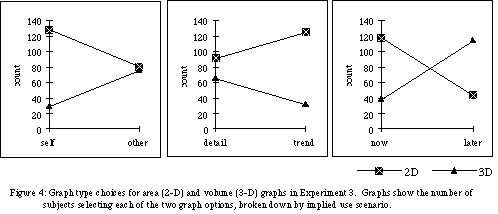
We examine students' preferences for graphical display formats under several use scenarios. Line graphs were preferred more for conveying trends than details, and more for promoting memorability than for immediate use; bar graphs showed the opposite pattern. 3-D graphs were preferred more for depicting details than trends, more for memorability than immediate use, and more for showing others than oneself. The reverse held for 2-D graphs.
Do glitzy graphics do more than attract the eye? How can quantitative information best be rendered on 2-D surfaces such as paper or computer screens to facilitate easy and accurate comprehension and memory? In this paper we report the results of three studies of people's preferences for graphical displays in which 2-dimensional data sets are rendered as dots, lines, or bars with or without 3-D depth cues. In these studies we focus on the cases in which 2-dimensional data had to be displayed, and a choice had to be made about the general type of display to use, as well as the preferred dimensionality of the graphical elements. Given the ease with which any of tens or hundreds of different graph types can be generated using even the most basic of available graphics packages, the question is one with which journalists, scientists, designers, and statisticians are confronted daily.
To be understood, graphics must first be accurately perceived. Cleveland and colleagues [3-5] have characterized the ability of the human perceptual system to extract information from graphs when presented in various geometric forms, such as angles, lengths, areas, and volumes. This low-level analysis has yielded "hierarchies" in which basic elements are ranked in terms of comprehension scores. For graphs of a dimensionality equal that of the data, accurately perceiving and understanding all of the properties of the display is critical to extracting the information. However, for 3-D displays in which the depth does not represent any additional quantitative information, the viewer must deal with redundant and extraneous cues.
One obvious place to turn for advice on selecting graphs is the graphic design community. The message from designers is straightforward: simple and clear is better, extra ink is bad, and extraneous information detracts from the impact of the graphic [11]. In one example, Tufte starts with a complex figure with extra 3-D shading and, in accordance with the goal of maximizing the ratio of data to ink in a graphic, strips out the elements generating the illusion of depth. The argument is that if the information being displayed is inherently 2-dimensional, the graphic should be 2-dimensional as well. According to Tufte, rendering uninformative depth is a bad idea in principle because it can lead to misperception of the information of interest, and it can hide the real content from the viewer.
These admonitions are largely based on the cumulative experience of talented professionals, and for the most part make sense. For empirical support we can turn to the literatures on visual perception and visual illusions. Early in this century, Gestalt psychologists repeatedly demonstrated that interactions among elements in a visual display can result in a perception very different from the simple physical description of the components of the display. In addition, there are countless examples of displays in which the perception of a given stimulus varies significantly, depending on its relationship to other, contextual elements in the visual field [6]). For example, Jordan & Schiano [7] found that the perceived length of a single test line can be greatly affected by the presence of one additional context line in the visual display; moreover, the size and direction of the resulting distortion depended systematically upon the relative proximity and size of the context line to the test line. In his how-to book on graphical design, Kosslyn points out that the ultimate goal of the designer is to have control over the perceived properties of a graph -- not merely the physical properties of the page or screen rendering [8]. Given the sort of data described above, it could easily follow that rendering false depth cues in graphical displays of quantitative information amounts to placing extraneous information on the page at the risk of introducing perceptual distortions.
However, in the context of 3-D displays, the conclusions are not necessarily clear. Such displays may be difficult to perceive when there is ambiguity in the 2-D representation of a 3-D object, as in reversible figures such as the Necker cube or Escher drawings. What remains to be seen is whether 3-D objects are detrimental to accuracy and speed of judgments from graphics. Also, what parameters of 3-D rendering can be manipulated to minimize its harm? Finally, are there any benefits to depth cues, and what parameters maximize them?
The little research that does bear directly on the comparison of 2-D vs. 3-D displays of 2-dimensional data has focused primarily on the extent to which information is accurately perceived in graphs of different dimensionality. Results from both perceptual match and magnitude estimation studies have been interpreted as evidence that added dimensionality has little or no effect on accuracy [2, 10]. However, there are several alternative interpretations of these findings, some of which will be taken up in the Discussion.
Taken all together, the message would seem to be telling us to "keep it simple, stupid." However, this is not the way the world is. For one thing, the world we perceive is rich, complex, and even ambiguous. For another, a glance at the morning paper should convince anyone that the graphics arms race is on. The ratio of data to ink in many publications is going down fast. Information providers are increasingly producing graphics with colors, pictures, and all sorts of extraneous 3-D structure. Graph users as well as graph producers seem to have preferences and opinions about the effectiveness and appropriateness of these graphs.
Existing research on graphical displays suggests that the effectiveness of graphical formats varies with context and intended use, but little if any research exists that demonstrates the extent to which people have sound intuitions about which graph types are best. One exception is Carswell et al.'s study [2] in which students made judgments about imaginary universities. They were provided information about two different universities in the form of several graphic displays. The impressions that the students formed about each university were directly influenced by whether the information had been presented in 2-D or 3-D graphs. In three studies, we examine people's preferences for different types of graphics, depending on the use to which the graphic is to be put.
The subjects were 161 Stanford University undergraduates enrolled in an introductory Psychology course.
Questionnaire
Subjects were given a booklet with several questionnaires, including the one described below, which they were instructed to take home and complete over the course of two days. Estimated time to complete the entire packet was roughly 1-2 hours, with the page for this study taking no more than a few minutes.
A one-page questionnaire was used to probe subjects' attitudes about a set of graph formats: the top half of the questionnaire contained 9 panels of graphs illustrated below. The graph panels were arranged to form a 3 x 3 matrix, with each graph labeled with a letter from A to I. The bottom half of the page presented subjects with 6 scenarios to consider.
Data sets
The hypothetical data set displayed in each of the graphs was comprised of nine data points. The data set contained 6 trend reversals, where a trend reversal is defined as the change in slope of the graph (positive to negative or vice versa).
Graphs
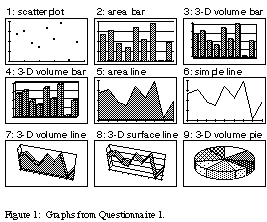
Nine types of graphs were created in the software program Excel [1]: (1) a scatterplot, (2) a simple bar graph, (3) a 3-dimensional volume bar graph, displayed from the perspective of a viewer looking up from below the x-axis plane, (4) a 3-dimensional volume bar graph, displayed from the perspective of a viewer looking down from above the x-axis plane, (5) an area line graph, (6) a simple line graph, (7) a 3-dimensional volume line graph, displayed from the perspective of a viewer looking down from above the x-axis plane, (8) a 3-dimensional surface line graph, with the same perspective as the 3-dimensional volume line graph, and (9) a 3-dimensional volume pie graph. [see Figure 1]
Scenarios
Subjects were asked to "imagine yourself as a research scientist working at a high-tech firm. You have been given the chance to present the findings from you work to the Board of Directors of the company. Your research assistant has been assigned the job of preparing the slides that you will need. Given each of the scenarios listed below, decide which graphs (give your first and second choice) you think would be the best given the circumstances." The 6 scenarios were: [note - italicized labels did not appear on the actual questionnaires]
1) [patterns] In preparation for your talk, you are trying to get a better feel for your data, and want to see a graph that will help you visualize the patterns and important aspects of your findings.
2) [gist] You have only a few minutes to get your points across to the board. In fact, you really don't want the board members to worry too much about details, but rather to focus on the "gist" of what you are saying.
3) [details] You've just been warned that the board is going to ask you very detailed questions about your work, and that you might have to get down to the "knitty gritty" [sic] of what your work shows.
4) [trends] From past experience, you know that your main objective should be to present information to the board in such a way that they can pick out the trends and extrapolate from your findings.
5) [contrast] You want to convey the fact that the most exciting part of your work is reflected in certain data points (such as the minimum and maximum values). You will be contrasting different data points to get this across.
6) [memory] You know that just after your presentation, your colleague will be presenting contradictory findings. You want the board to be able to remember your results, and compare them to what they hear in the next talk.
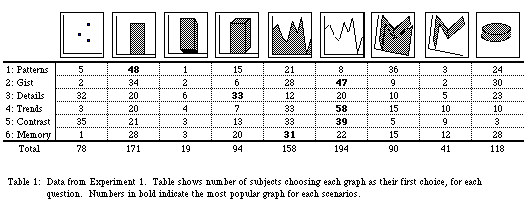
The pattern of preferences for the 9 graph types for each of the 6 scenarios is given as Table 1. Our subjects' choices were clearly not due to random variation ([[chi]]2 = 304.959, p < .0001). Due to the exploratory design of this study, the data do not lend themselves to a rigorous statistical analysis. Nevertheless, some conclusions do seem warranted. The area bar graph and the simple line graph, two familiar types, were the most popular overall. Of the two 3-D volume bar graphs, subjects greatly preferred the view from above to the view from below (94 to 19). Of the two 3-D line graphs, they chose the 3-D volume more often than the 3-D surface (90 to 41). For Scenario 1, which emphasized understanding the data for one's self, subjects liked a bar area graph best. (This type is arguably one of the most familiar.) For getting a point across quickly (Scenario 2) or picking out general trends (Scenario 4), subjects preferred a simple line graph.
The subjects were 110 Stanford University undergraduates enrolled in an introductory Psychology course.
Questionnaire
Subjects filled out a 1-page questionnaire, of the same format and distributed in the same manner as in Experiment 1.
Data sets
Two versions of the questionnaire were prepared, differing only in the nature of the data depicted in the graphs themselves. Each data set consisted of nine data points. In one version, the general trend (GT) data set, the graphs of the data formed a slightly right-skewed curve. In the second version, the data points were selected to create a multiple reversal (MR) data set. Applying the definition of a trend reversal as the change in slope of the graph (positive to negative or vice versa), the GT data set contained 1 trend reversal, while the MR data set involved 6 trend reversals. Data set (GT or MR) was a between-subject variable.
Graphs
Nine types of graphs were created. The graphs are shown in Figure 2, and included: (1) a scatterplot, (2) a simple line graph, (3) an area line graph, (4) a 3-dimensional volume line graph, (5) a 3-dimensional surface line graph, (6) a simple bar graph, (7) an area bar graph, (8) a 3-dimensional volume bar graph, and (9) a 3-dimensional surface bar graph, in which only the tops of 3-dimensional bars were used to indicate quantity on the y-axis.
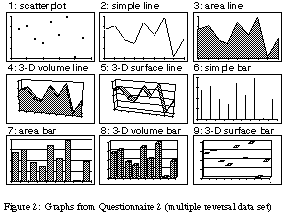
All graphs were created using standard graphing commands in Microsoft Excel [1], except for graphs 6 & 9, which were rendered in a drawing program.
Scenarios
The 6 scenarios listed below were designed to set up contrasts on three dimensions: self vs. other (scenarios 1 & 2), details vs. trends (scenarios 3 & 4), and now vs. later (scenarios 5 & 6).
1) [self] You've just finished collecting all this information. You want to see it graphically displayed so that you can understand what is going on. This is just for your own use; you won't be showing the graph to others.
2) [other] You need to represent your data graphically for a group of people. Conveying what is going on to them is critical. You want them to understand your findings as fully as possible.
3) [details] You want to make a graph that will show the detailed relationships in the data. It is important that the specifics of how each data point relates to the others be evident in the figure. The details are critical.
4) [trends] You need to quickly show general trends in the data. One should be able to just glance at the figure and understand what is going on. The important thing here is the "gist."
5) [now] You need to present your data to help people make an immediate decision. It makes no difference if they remember this next week--the decision needs to be made correctly today. The graph should convey the information right here and now.
6) [memory] Your data will be used to make a decision in a few weeks. Someone looking at your graph will need to be able to remember it's content later without referring back to it. You should make the figure as memorable as possible.
The more structured design of this survey also permits a more detailed analysis. We can look at preferences for graphs of different dimensionality by collapsing over data set and collapsing the line and bar graphs. When we do so, a consistent pattern emerges. For all of the 3 pairs of questions, subjects' preferences for simple, area, 3-D volume, and 3-D surface graphs changed systematically. Simple and area graphs were liked for some sets of circumstances, and 3-D volume and surface graphs for others (see Figure 3a). Subjects liked simple and area graphs better for their own use than for presenting to others; the opposite pattern held for 3-D volume and 3-D surface plots. They chose the 3-D graph types more often when the data had to be remembered, and simple and area graph types more often when the figure was for immediate use. Finally, they liked the two types of 3-D graphs better for showing detailed relationships than for showing the "gist", while the opposite pattern held for the simple and area graphs.
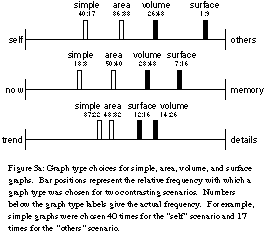
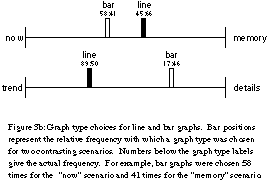
Both of the patterns described above were robust; each holds for both the multiple reversal data set and the general trend data set results individually, as well as for the combined data.
The subjects were 157 Stanford University undergraduates enrolled in an introductory Psychology course.
Questionnaire
Subjects filled out a 1-page questionnaire, similar in format and distributed in the same manner as in the previous experiments. Four versions of the questionnaire were created by crossing type of graph (line vs. bar) and order of presentation (2-D area graph first vs. 3-D volume graph first).
Data sets
All versions of the questionnaire depicted the multiple reversal data set used in Experiment 2.
Graphs
Each questionnaire displayed only two graphs: an area graph and a volume graph. The graphs were either line graphs or bar graphs.
Scenarios
Subjects were shown the six scenarios used in Experiment 2, and were given the same instructions--to pick the graph most appropriate for each situation described.
When assessing the pattern of results for each of the three continuum--self vs. other, detail vs. trend, and now vs. later--significant interactions exist between the dimensionality of the graph and the proposed use scenario ([[chi]]2 = 62.59, [[chi]]2 = 59.07, and [[chi]]2 = 71.86 respectively).
Why this robust pattern of preferences for these 3-D graphs? Our subjects consistently selected 3-D graphs for various scenarios, and rejected them for others. Moreover, out in the real world scientists and business-people are voting with their feet (and their trackballs and mice) for 3-D graphs. This may be just the tip of the iceberg, considering the general proliferation of 3-D interfaces and computing environments being developed.
We propose two possible explanations for these preferences. The more parsimonious of the two is a simple discriminability or salience account. In Experiments 2 & 3, subjects chose the 3-D volume (and surface) graphs more often when the scenario demanded memory or showing data to others. Under these conditions people may feel that extra graphical flourishes will make the figure stand out, making the graph both more memorable and more impressive to others.
A second explanation derives from the ecological and evolutionary situatedness of our visual systems. We have evolved to deal with a world of 3-D objects and 3-D scenes. Figures that more strongly suggest a spatially realistic environment may better engage our visual systems, and may be more easily coded in terms of schemas we have for visual scenes. This kind of facilitation could be helpful for communicating a pattern to others or keeping it distinct in memory. This hypothesis might also explain why people like 3-D volume graphs more than 3-D surface graphs: the former more closely resemble solid objects such as the ones we deal with in the real world. While this view is not directly addressed in the work we report here, it serves as an interesting and plausible explanation. Our subjects did seem to have had a sense that graphs with depth were more appropriate for communicating and remembering, and they found realistic volumes preferable to unlikely floating surfaces. Could it be that their intuitions were in line with their actual abilities?
This possibility has some support in the small literature directly comparing 2-D and 3-D graphs of quantitative information. Two recent studies [2, 10] failed to find a difference in accuracy of estimates from 2-D and 3-D graphs. However, one of these studies [2] failed to distinguish between 3-D surface and 3-D volume graphs; the other [10] averaged data over several heterogeneous 3-D graph types. In light of the great differences we found in peoples' preferences for these types of graphs, it seemed worthwhile to attempt a more direct comparison. In a recent series of studies in our laboratory [9], we compared analogous versions of 2-D area and 3-D volume bar graphs. Under these conditions, we found a reliable and suggestive effect of dimensionality: adding depth cues impaired accuracy in both a magnitude estimation and a perceptual match task. However, this performance difference was small. Moreover, it vanished when subjects had to make their judgments from memory (perceptual match task exercising a very short-term form of working memory).
At this point we can conclude with some certainty that people prefer graphs of quantitative information enhanced by 3-D shading for some situations. More pronounced and important is the fact that these preferences show a systematic structure. For our subjects, adding 3-D shading to 2-D displays amounted to more than simply adding more ink to the page, or pixels on the computer screen. The challenge for designers and consumers of graphics is to learn about and take advantage of these preferences for features inherent in graphic displays. For behavioral scientists, it is to discover the extent to which these preferences have a basis in the human perceptual system.
2. Carswell, C.M., Frankenberger, S., and Bernhard, D. (1991). Graphing in depth: Perspectives on the use of three-dimensional graphs to represent lower-dimensional data, Behaviour & Information Technology, 10(6), 459-474.
3. Cleveland, W.S. (1985). The Elements of Graphing Data, Wadsworth Advance Books and Software, Monterey, CA.
4. Cleveland, W.S. and McGill, R. (1984). Graphical perception: Theory, experimentation, and application to the development of graphical methods, Journal of the American Statistical Association, 79, 531-553.
5. Cleveland, W.S. and McGill, R. (1985). Graphical perception and graphical methods for analyzing scientific data, Science, 229, 828-833.
6. Coren, S. and Girgus, J.S. (1978). Seeing is Deceiving: The Psychology of Visual Illusions, Lawrence Erlbaum Associates, Hillsdale, NJ.
7. Jordan, K. and Schiano, D.J. (1986). Serial processing and the parallel-lines illusion: Length contrast through relative spatial separation of contours, Perception & Psychophysics, 40(6), 384-390.
8. Kosslyn, S.M. (1994). Elements of Graph Design, W.H. Freeman and Company, New York, NY.
9. Levy, E., Schiano, D.J., Zacks, J., and Tversky, B. (1995). Representing information in graphs, Paper presented at the meeting of the Psychonomics Society, Los Angeles, CA.
10. Spence, I. (1990). Visual psychophysics of simple graphical elements, Journal of Experimental Psychology: Human Perception and Performance. 16, 683-692.
11. Tufte, E.R. (1990). The Visual Display of Quantitative Information, Graphics Press, Chesire, CT.