







|
|
Gribnau, Maarten and Pasman, Gert
Delft University of Technology
Jaffalaan 9
2628 BX Delft
The Netherlands
voice: +31 15 2785039
fax: +31 15 2784956
Simple intuitive manipulation of three-dimensional objects is needed for the conceptualizing phase of design. Present CAD systems do not allow for the quick and interactive generation and development of objects, which are based more on free-form ideas than on hard numerical input. This video presents a prototype envisionment that uses intuitive 3D sketch input with two hands.
Tactile or gestural I/O, visualization, input devices, two handed input
The IDEATE research project [1] at our faculty concentrates on the conceptualizing phase of the industrial design process; how designers generate ideas and create form, and what kind of tools are used for these activities. The goal is the development of an advanced electronic environment, made up of multi-nodal tools, to support designers in the generation and development of new product forms; tools for creative thinking, visualizing and conceptualizing. This video reports on a concept for one of these tools: TIME, a 3-D sketching device.
Current 3-D CAD systems are heavily used at the end of the design process when most of the geometry of a product is already determined. However, in the conceptual phase, where initial ideas are being generated and explored, designers still rely on the traditional design tools like pencil and paper. These lack processing capabilities but instead score high from the point of view of the designer as a performer, who puts high demands on his instruments, concerning flexibility and agility, to perform his act, being the creation of a new product form [2].
In a previous study [3] it was noted that designers use both hands for most actions. While a fairly obvious notation, this analogy has yet to be fully offered to the human computer user [4].
However, the first attempts are being made. Examples include the 3-DRAW system from the M.I.T. CAD Lab [5], which uses two hands to create objects in 3-dimensional space and our own Turntable/Grabber project [6], which uses a special input device for rotating/tilting a computerized object with one hand, and another specialized device for selecting/altering points on the object.
The goal of this project was therefore the development of a concept for a 3-D sketching device, which would a) allow simple and intuitive generation, manipulation and evaluation of three-dimensional objects in the conceptual phase, and b) make use of both hands for input. The concept was named TIME: Three-dimensional Input, Manipulation and Evaluation.
To derive the requirements for TIME 13 interviews with professional industrial designers were conducted, in which they were asked for their design habits, drawing techniques and their preferences and ideas for an ideal sketching tool [7].
Based on the results of the interviews 6 different interaction-concepts for TIME were generated. These concepts were then laid before a panel of 11 respondents. From their comments a program of requirements was listed, upon which the final concept of TIME was based [7].
TIME consists of three pieces of hardware: the pen, the watch and the tablet (figure 1). The pen is used for sketching and manipulating on both the watch and the tablet. Switching between these two modes is accomplished by pressing a button on the graphical user interface. The watch is used for positioning the sketch plane, evaluating the model and placement of the lights. It is to be held in the non-dominant hand and has three buttons.
The tablet is the main input for sketch data and displays the graphical user interface. Extra functionality on the tablet includes manipulation of the camera settings. Trackpads are used to perform panning rotation and zooming.
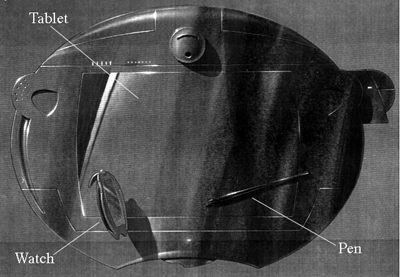
Figure 1. The TIME hardware
There are two graphical user interfaces, one on the watch and one on the tablet. The interface on the watch is kept to a minimum because of the limited screen area. It is used to set the mode of the watch to that of object mode, camera mode or light mode. The other graphical user interface is located on the tablet. Its main functionality's include the interface to the file system, the libraries of pre-defined contours, profiles or shapes and the selection of different editing tools.
The software assists in three major tasks: input, modification and evaluation. All of the sub-tasks have been divided over the input devices, taking into account the properties of the hands mentioned before.
For input, several strategies are available. The combination of input devices is well suited to the extrusion of two-dimensional contours, the dominant hand is used for drawing the contour to be sweeped while the non-dominant hand defines the path the contour travels.
Three types of object modification tasks are offered with two-handed support; common edit tasks (e.g. copy/paste), local deformations (vertex, curve editing) and global deformations (scaling, bending etc.).
Evaluation of the model under construction can either be object-oriented or scene-oriented. An example of the first technique is the possibility to evaluate cross-sections of the model by moving the watch inside the object, the cross-section will then be displayed on the watch. The second evaluation technique is used when the camera's position or orientation is manipulated by one of the track pads on the tablet.
Scripts are used to the define the interaction between the software, the input devices and the user interfaces. For each essential modeling operation, several possible strategies are considered and defined. In addition to the static scripts a video was made to show this interaction in full motion.
The authors would like to acknowledge Gianni Orsini for his work on this project and Rob Maas of the Audio Visual Center of the Delft University of Technology for his work on the video.
1. Hennessey, James M. The IDEATE project: Exploring computer enhancements for conceptualising. Automation Based Creative Design, Tzonis, A., White, I. (Ed.), Elsevier Science B.V., Amsterdam, 1994, 349-362
2. Lakin, F. et.al. The electronic design notebook: performing mediumand processing medium. The Visual Computer, Vol 5, 1989, 214-226
3. Kolli, R., Pasman, G., Hennessy, J.M. Some considerations for designing a user environment for creative ideation. Proceedings of Interface '93, North Carolina State University, Raleigh, 1993, 72-77
4. Buxton, William A.S. The three mirrors of interaction: a holistic approach to user interfaces. Interacting with Images, Sainsbury Wing, London, 1993
5. Roberts, A., Sachs, E., Stoops, D. 3-DRAW: A three dimensional computer-aided design tool. IEEE Computer Graphics and Applications, Vol 11, No 6, 1992, 18-26
6. Hennessey, James M., Gribnau, M., Stuyver, R. Two-handed modeling of three-dimensional computerized objects with the help of specialized input devices. Adjunct Proceedings of HCI '95, University of Huddersfield, 1995, 13-16
7. Orsini, Gianni. CAD gebruiksconcept voor 3D schetsinvoer. (Dutch), Masters thesis, Faculty of Industrial Design Engineering, Delft University of Technology